Exotool: Product Assessment and Recommendations
Prepared for Hubert Lane by Cyrus Prescod · 4 November 2026
Hubert, this is my independent view of where Exotool stands today and the changes I think would matter most. I have built with the platform alongside you, and you have already acted on some of my earlier feedback. Everything below is meant as input for your decisions. It is not a request for work from me.
1. Owner brief
The short version. Exotool's core idea is strong and, among the products I compared, uncommon: a builder writes logic once, and the compiler places it on the device or the server and builds the communication between them. The tooling around that idea has recently become very agent-friendly: revisions, backups, undo, compile errors with exact paths, and part inspection. What holds the product back is mostly what people see and touch first. The generated app shell is dated, it blocks zoom, and it still uses a removed offline technology. New builders also have no clear path from “I have an idea” to “I have a useful app.” Three changes would do the most for learning, power, attractiveness and competitiveness, with little disruption to existing apps.
Who benefits: every end user first; novices get a good-looking first app; agencies get client-ready output.
Why you should care: people judge the platform by its output in the first minute. Today a novice's first app looks older than what AI tools generate.
Who benefits: novices learn faster; experts and agencies trust bulk and AI edits.
Why you should care: it turns revisions, backups and save summaries you already built into a visible feature people can buy.
Who benefits: agencies and business owners whose staff already work in assistants; end users whose data stays protected.
Why you should care: as agents become normal, “can my assistant safely run this app's workflow?” becomes a buying question. Your compiler can answer it.
Disruption to existing apps: all three can be opt-in. A new theme preset sits beside the existing presets, the new shell is applied on the next compile, and the report reads data the compiler already produces. Declared access rules are the only item that changes the data model, so they come last.
Where to look next: section 2 opens with an 11-row list of where Exotool can be improved, with evidence and severity. Section 3b sets out 8 steps that would widen Exotool's moat, each with a frank note on how hard it would be to copy. Section 3c shows a clickable mockup of the direction, with every part mapped to an existing Exotool feature or a numbered recommendation.
About this assessment
Labels used: Observed seen directly in shipped code, docs or screens · Inference my reading of the evidence · Proposal a suggested change. Findings from the rundown are attributed to it unless I re-checked them. One app's behavior (for example Sponsor Desk) is not treated as a platform-wide limitation unless a platform file or doc shows the same thing.
2. Strengths and friction map
Each material finding has a source and a confidence level. Proposals are kept out of this section and appear in section 3. The table below is the short answer to “where can Exotool improve?”. The detailed evidence follows in 2a–2d.
Where Exotool can be improved: at a glance
Severity is my judgment of the harm to users if nothing changes: High blocks or drives users away, Medium slows them or adds risk, Low is polish. “Fix” points to the recommendation in section 3.
| # | Area | What falls short today | Evidence | Who it hurts | Severity | Fix |
|---|---|---|---|---|---|---|
| 1 | Accessibility of generated apps | Pinch-zoom is blocked; sample inputs have no labels; the main action is a link, not a button; placeholders are low-contrast; page language is unset. | Observed in 3 pages and 1 sample | End users with low vision or using screen readers; agencies with legal obligations | High | R1 |
| 2 | Install and offline | Offline relies on AppCache, which Chrome and Firefox have removed. No web app manifest link or service worker in the pages checked. | Observed markup; Inference on effect | End users on phones and in weak signal; owners promised a “PWA” | High | R2 |
| 3 | Default visual quality | 3 app themes, likely from 2016; small grey labels; flat list-row buttons; placeholder copy in a public sample. Good results need hand-written CSS. | Observed screens and presets | Novices (first app looks dated); agencies (restyle every project) | High | R3 |
| 4 | Getting started | 45 samples listed by internal names, mixed with test fixtures; the tour has to be found; the sign-in page shows no example of what Exotool makes. | Observed | Novices and evaluators | High | R4 |
| 5 | Editor learning curve | About 15 manual layout rules; documented workarounds for broken form icons and Buttons Row; a misplaced link is reported on save, not prevented while dragging. | Observed in the docs (canvas not viewed) | Novices | Medium | R6 |
| 6 | Seeing what changed | Save summaries, backups and undo exist but are not visible as a review step. Only 4 backups are kept, with no named versions. | Observed in the MCP tools and the rundown | Agencies; anyone accepting AI edits | Medium | R5 |
| 7 | Permissions model | Access checks are hand-written in each activity. No declared “owner may edit” rules; a clean compile says nothing about access. | Observed in the language docs | End users' data; owners' liability | High | R7, R9 |
| 8 | Portability | No downloadable export of the diagram, assets or compiled app was found. | Not found in the docs checked | Agencies; buyers who fear lock-in | Medium | R11 |
| 9 | Live messaging safety | Messages travel in GET URLs, and the channel key is optional on the client. | Observed on the client; server not seen | End users; owners | Medium (unconfirmed) | R12 |
| 10 | AI help inside the editor | Helper Ask exists but may not be switched on, and it cannot yet propose a fix you can accept. | Observed code; status unknown | Novices; busy experts | Medium | R10 |
| 11 | Assistants using finished apps | API endpoint nodes exist, but they are not offered as scoped MCP tools that run as a specific user. | Observed in the docs | Agencies and clients whose staff work in AI assistants | Medium (growing) | R8 |
2a. Strengths to keep
| Finding | Type | Evidence | Confidence |
|---|---|---|---|
One body of logic; the compiler places each statement on device or server and builds the communication. Declarations (declare_location) and if_on_client/if_on_server pairs give explicit control where needed. | Observed | Overview §6; Language §8–9 | High |
| The app model is a JSON diagram with revision checks, a backup before each save (the newest 4 kept), one-step undo, JSON-Patch edits, and compile errors returned with exact paths. | Observed | Exotool MCP server instructions and tool descriptions; rundown | High |
| Compile facts per element: the variables each element reads and writes, where they live (client or server), and where its code runs. Available without a new compile for projects compiled since 23 Oct. | Observed | exotool_inspect_diagram description and output on Sponsor Desk | High |
| Visual flows with conditional connectors, sheets, symlinks, sub-views and calls with error hooks. A step debugger shows client and server statements waiting at the same time, plus a Variables window filtered by location. | Observed | Editor guide §2, §6, §13–14 | High (from docs; canvas not viewed) |
| Reusable parts: placeholders, presets, extract and insert of parts, and a “complete cluster” check before a move or copy. | Observed | Editor guide §8; MCP tool list; Sponsor Desk inspection (“Cluster: COMPLETE”) | High |
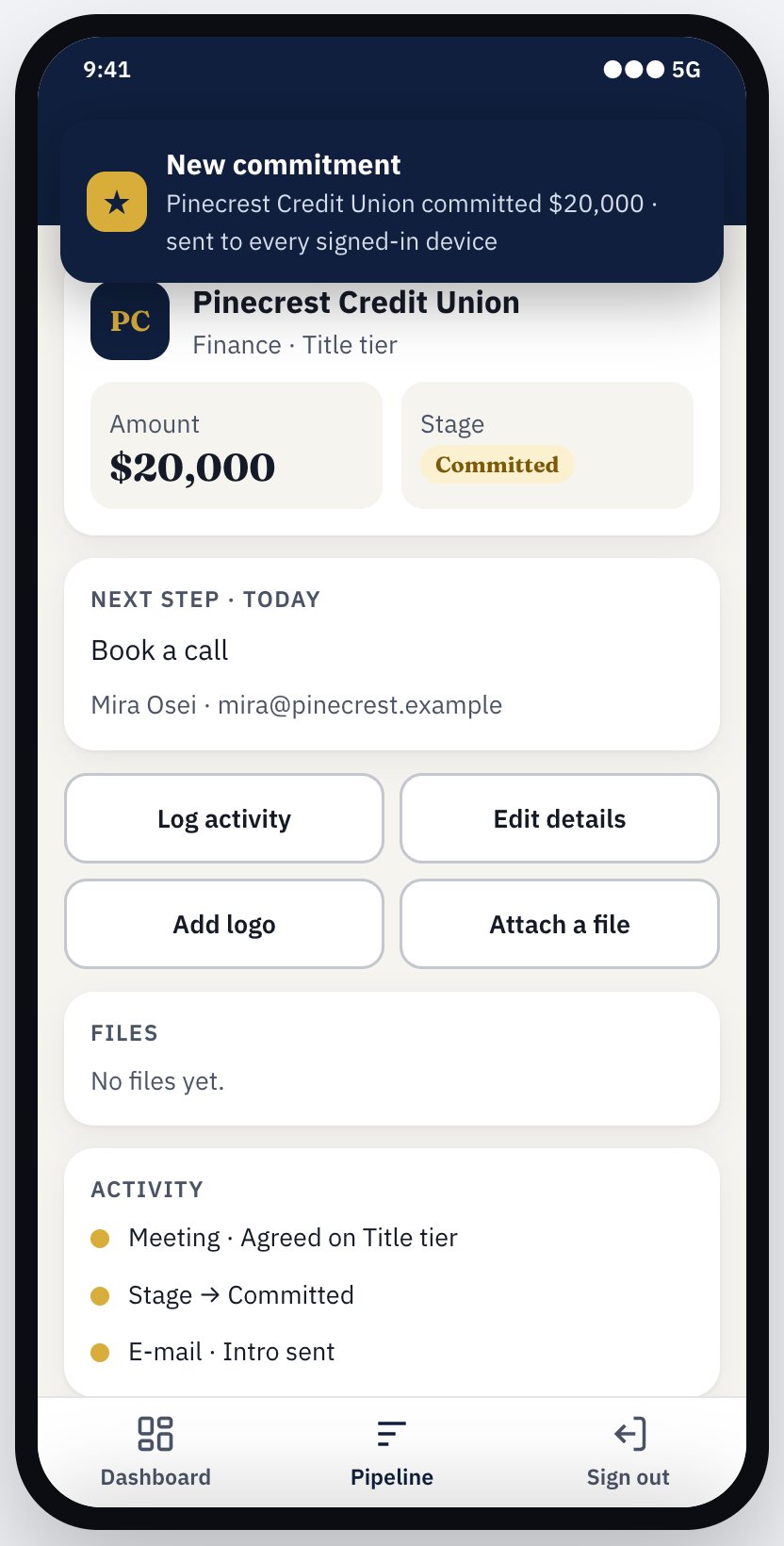
| Live messaging between users (signal and listen) built in; Sponsor Desk uses it for a “new commitment” notice. | Observed | Rundown; Sponsor Desk diagram | High |
| A published API endpoint node turns a flow into a server-side endpoint, and Exotool writes JavaScript and Python call examples for it. | Observed | Editor guide §9 | High |
| A three-tier data store (single file, file-per-object, MySQL resource). Credentials stay in resources, outside the diagram. | Observed | Editor guide §11 | High |
| 45 copyable system samples, from widget demos to 10-screen apps (Expense Splitter, Field Service, Marketplace). An Expense Splitter Helper tour and a 55-rule Helper. | Observed | exotool_get_example; rundown (editor code dated 2 Nov) | High |
| A capable builder can reach a high visual standard: Sponsor Desk's sign-in screen is polished at desktop and 375 px phone widths. | Observed | Screenshots, 4 Nov | High for this app only |
| Fast response to feedback: about 40 dated fixes and features between 22 Oct and 2 Nov. | Observed | Rundown (dated code comments) | High |
2b. Friction, by person and journey stage
| Stage | Finding | Type | Evidence | Conf. |
|---|---|---|---|---|
| Discovery (all) | The editor sign-in page uses a plain blue bar, small grey labels, a “Sign In” list row that does not look like a button, and the line “the rapid Mobile Application Development System!!”. It does not show what Exotool makes. | Observed | Screenshot of app.ops.exotool.com, 4 Nov | High |
| Sample selection (novice) | Samples are listed by internal name (applib_028_expense_splitter, clent_call_test_5), with test fixtures mixed in among real starters. The element_gallery preview opens on “Hello World!” with a tab titled “My Mobile App”. | Observed | Sample list; element_gallery preview | High |
| Visual editing (novice) | The editor guide's best practices are mostly manual layout rules (about 15: arrows left to right, arrival slots, symlink placement, row layout). It also lists workarounds for known defects: form-field icons “do not render correctly”, and a Buttons Row in a form “does not behave as expected”. A link placed directly on a page is reported on save but not prevented in the editor. | Observed / Inference: learning cost is high | Editor guide §4, §12 | High (docs); editor not viewed |
| Flow logic (novice) | The code needs a precise mental model in some places. JS blocks don't wait for pending server values. always runs only on the device and only after the flow first reaches it. Unpaired if_on_client bodies silently drop out (now a warning). | Observed | Language §7, §9, §11 | High |
| Generated app (end user) | Generated apps and the editor set user-scalable=no, maximum-scale=1. That blocks pinch-zoom, which the W3C treats as a failure for text resizing (ACT rule “Meta viewport allows for zoom”; WCAG 1.4.4, Level AA). | Observed | Sponsor Desk and editor HTML; Expense Splitter sample | High (3 pages; likely a platform template) |
| Generated app (end user) | On the Expense Splitter sample, inputs have no programmatic label (only a placeholder), the placeholder is 35% black (low contrast), “Log In” is a link with href="#" rather than a button, and the page language is empty. | Observed (one sample) | Browser accessibility tree and DOM check, 4 Nov | High for the sample; platform-wide not established |
| Installability and offline | Apps declare offline support with <html manifest="manifest.php">, which is AppCache. Chrome removed AppCache in 2021, Firefox removed it, and Safari deprecated it in 2018 (web.dev, “Preparing for AppCache removal”). No link rel="manifest" or service worker was found in the generated pages checked. iOS “add to home screen” meta tags are present. | Observed / Inference: offline and install prompts do not work in current Chromium browsers | Sponsor Desk and editor HTML; sample DOM check; rundown | High that the markup is legacy; medium on the exact effect per browser |
| Visual system | 3 app-level themes (“material default”, “iOS default”, “iOS Fancy”). Other styling is per-element presets. The preset IDs look like PHP uniqid values from 2016. Front end: Framework7 1.4. | Observed / Inference on age | Preset catalogue; rundown | Medium-high |
| Versioning (agency) | 4 automatic backups per project, plus a Backups page. Named versions, branches or comparisons between versions were not found. | Observed / not found | MCP instructions; rundown | Medium (editor not viewed) |
| Portability (agency) | Projects can be copied inside Exotool. A downloadable export of the diagram, assets and compiled app was not found in the docs checked. | Observed / not found | Editor guide; MCP tool list | Medium |
| Permissions (all) | Access control is written inside activities with functions such as is_admin_user() and get_current_session(). The docs warn that the device-side user_is_admin must not decide sensitive operations. Declared record-level rules (“only the owner may edit”) were not found. | Observed / Inference: security depends on every builder writing checks correctly | Language §13 | High |
| Correctness vs compile | Sponsor Desk compiles with 0 errors on revision 25. That shows the design is well formed. It does not show the business behavior is right or that data access is secure. | Observed | exotool_get_build_errors, 4 Nov | High |
| Live messaging | Broadcasts send the message in the URL of a GET request, and the channel key is optional in client code. | Observed (client) / Inference on server enforcement | Rundown | Medium; server code not seen |
| Agents (builder) | Claude can edit through MCP, the editor shows “Claude: <action>” notices, and there is an MCP Tokens page. Helper Ask exists, but whether it is enabled on the live server is unknown. | Observed | Rundown | High / unknown for Ask |
2b-ii. The journey for three people
| Stage | Novice building a first useful app | Expert or agency maintaining several apps | Person using a finished app |
|---|---|---|---|
| Discovery and onboarding | Friction: the sign-in page shows no examples of output; the tour exists but has to be found Observed | Strength: MCP lets an assistant do repetitive edits Observed | First screen quality depends on the builder. Defaults look dated; custom work (Sponsor Desk) looks current Observed |
| Choosing a starting point | 45 samples, named by internal ID, mixed with test fixtures Observed | Copying a project is reliable and complete Observed (docs) | n/a |
| Visual editing and flows | Many manual layout rules to learn Inference from the docs | Sheets, symlinks, sub-views and calls scale to large apps Observed (docs) | n/a |
| Debugging and error recovery | Helper cards explain compile and deploy failures in plain words Observed (rule table) | Step debugger across client and server; errors with paths; undo Observed | Server errors retry; failures show as alerts. Offline reload is not supported in current Chromium browsers Inference |
| Design and accessibility | Default theme and small type; zoom is blocked Observed | Must restyle each project by hand, in CSS or templates Inference | No pinch-zoom; labels missing in the sample checked Observed |
| Integrations and permissions | Resources keep secrets out of the diagram Observed; permission checks must be hand-written Observed | Same rule code repeated across apps Inference | Data safety depends on each builder's checks Inference |
| Versions, portability and maintenance | Undo covers a bad save Observed | 4 backups; no named versions or export found Observed/not found | Platform updates apply on recompile Inference |
2b-iii. Visual design: observed defects and opportunities
Observed defects (editor sign-in page, Expense Splitter sample, element_gallery sample; screenshots of 4 Nov):
- The primary action (“Sign In”, “Log In”) is a thin list row with no fill, so it reads as text rather than a button.
- Labels are about 11–12 px grey, and placeholders are at 35% black. Hierarchy comes only from one bold heading.
- Pinch-zoom is blocked; the page language is unset; the sample inputs have no label elements.
- Placeholder copy (“My Mobile App”, “Hello World!”, “page1”) is visible in a public sample.
Design opportunities Proposal (the editor canvas was not viewed, so these are not defect claims):
- Editor sign-in and project list: a split layout with a live sample app on the right. Project cards with a thumbnail of the last compiled screen, the compile status and “edited by”.
- Palette: grouped by intent (Screens, Content, Forms, Lists, Logic, Live) with icons and a one-line hint. Only valid drop targets light up while dragging.
- Property panel: the 5 most-used fields first; advanced fields in a collapsed section. Inline validation next to the field, using the same words as the Helper card.
- Interaction states everywhere: hover, focus (2 px ring), pressed, disabled and error, with 44 px minimum touch targets in generated apps and 32 px in the dense editor.
- Typography and spacing: 16 px base in apps (14 px in the editor), a 1.25 scale, an 8 px spacing grid, and line length capped near 70 characters for content blocks.
- Mobile use of the editor: a read-only “review on phone” mode (change review strip, preview, comments) rather than full editing on a small screen.
2c. Comparison with AI-first and established visual builders
I compared the same job across seven products, using their own docs as of early November 2026. Some pages were read from short page summaries rather than in full, so treat details as “per the vendor's page”. “Not found” means not found in the pages checked. It is never a claim that the feature is absent.
The same task in each product
Task: add a form that logs a sales activity, saves it with server-side validation, lets only the record's owner edit it, and notifies teammates live. (Sponsor Desk's “Log activity” is the Exotool version.)
| Product | How it is built | Server-side validation | Owner-only edits | Live notice to teammates |
|---|---|---|---|---|
| Exotool | Visual popup and form plus one activity. Prompt through Claude over MCP, or by hand. | The same activity code. Checks the compiler places on the server; if_on_server with abort() (Language §9). | Written as a session or role check inside the activity (Language §13). No declared rule found. | Built in: signal and listen, already used in Sponsor Desk. |
| Lovable | Prompt, after an approved plan (Plan mode). Generates code. | Edge function or database constraint, written by the AI (Cloud). | Database row-level security (RLS), set through chat (database access), and checked by a Deep scan (security). | Realtime is listed in Cloud (Cloud). |
| Bolt.new | Prompt, after Plan Mode. Generates code. | Server functions (docs). | Database security settings; audit on paid plans (security). | Not found. |
| Replit Agent | Prompt, plan, then build (docs). Generates code. | Server code the agent writes, on managed PostgreSQL (docs). | Custom code with Replit Auth (checklist). | Not found. |
| Bubble | AI Agent prompt with Ask, Auto or Approve modes (docs), then visual workflows. | Backend workflow; front-end and back-end workflows are built separately. | Declared privacy rules on the data type (privacy). | Not confirmed in pages checked. |
| FlutterFlow | Visual actions. External coding agents propose changes you review (AI agent). | Cloud Functions (docs) or database rules. | Firebase or Supabase rules (product). | Through Firebase or Supabase streams (not read in full). |
| Glide | Chat-built app and tables (GlideOS). | Not found. | Row owners (first-party blog). | Not found. |
| Retool | Visual queries, or an agent through MCP (docs). | Server-side queries or workflows. | Row-level security and access policies (docs). | Live push to end users not found; editors collaborate live (multiplayer). |
What this shows. In the pages checked, no other product documents doing validation and saving in one piece of logic without a separate backend step, or a live notice as a built-in element rather than a database feature. That is a lead worth checking, not proof of exclusivity. Exotool is behind on one point: owner-only access. Bubble, Lovable and Retool make it a declared rule that can be checked or scanned. In Exotool it depends on the builder remembering to write the check.
Common expectations, plausible differentiation, and what could become hard to copy
| Category | Capability | Who documents it | Exotool today |
|---|---|---|---|
| Common expectations (table stakes: buyers assume them) | Prompt or AI help to build | All seven checked | Through Claude over MCP; Helper Ask status unknown |
| Plan shown before changes, then approve | Lovable, Bolt, Replit; Bubble's Approve mode | Not as a visible step (R5) | |
| History with restore | Lovable (history), Bolt (rollback), Replit checkpoints with database (docs), Bubble 14 days to 1 year by plan (docs) | 4 backups, one-step undo (R5) | |
| Declared row or owner access rules | Bubble, Lovable, Retool, Glide | Written as code (R9) | |
| Code or project leaves the platform | GitHub: Lovable (docs), Bolt, Replit, FlutterFlow (docs). Bubble: data export only (docs) | Not found (R11) | |
| Mobile output | Native via Expo: Bolt (docs), Replit (docs). Installable offline PWA toggle: FlutterFlow (docs) | Legacy AppCache markup (R2) | |
| Plausible differentiation (others offer parts of it) | Security review of an app | Scanners: Lovable (Business and Enterprise), Bolt (paid audit) | R7 would explain where data lives from compile facts, not by pattern-scanning code |
| Outside assistants run an app's own workflows | Bubble Workflow API (docs); Retool webhooks (docs). Lovable's and Bubble's MCP servers edit the builder, not a finished app's workflows (Lovable, Bubble) | API endpoint node exists; R8 would publish it as MCP tools that run as a user | |
| AI steps inside finished apps | Glide AI columns and actions (docs); Lovable AI connector (docs) | R13 | |
| Could become hard to copy (needs a compiler that understands the whole app) | One body of logic split automatically into device and server, with explicit hints when needed | Not found in the other products' docs checked (Bubble keeps the two separate by design) | Exists |
| A per-element map of what runs where and which data reaches the device, used for review, reports and agent edits | Not found in the docs checked | The data exists (compile facts); the product surface does not (R5, R7) | |
| A step debugger over client and server statements at once | Not found in the docs checked | Exists (Editor guide §13) |
Products not covered: DreamFlow, Softr, Adalo and all pricing pages. Plan gating is shown only where a page stated it.
2d. Agents in three roles
Sponsor Desk is used as the running example. Each role applies equally to any Exotool app.
| Role | A real user job | What Exotool can reuse | Minimum new capability | Ongoing operating burden |
|---|---|---|---|---|
| 1. Assisting the builder in the editor | “Add a ‘Log activity’ popup that saves a note, moves the stage and sets the next follow-up.” Or: “Why is my save failing?” | MCP patch, validate, undo, inspect and examples; Helper rules and cards with element links; compile errors with paths; “Claude:” notices. | Helper Ask grounded in the current diagram, compile errors and the docs. It proposes a patch and shows it as a reviewable change (recommendation R5). The builder accepts it, and the change is saved with the existing backup and undo. | Model charges per question (bring-your-own key or a metered plan); prompt and docs upkeep as the language changes; support for wrong suggestions. Undo limits the damage. |
| 2. Bounded work inside a finished app | In Sponsor Desk: “Draft a follow-up email from this sponsor's last three activities,” or “Summarise this week's pipeline changes for the Monday meeting.” | Server-side activities, cloud sets, SMTP resource, PHP blocks, resources for credentials, the location model that keeps keys on the server. | A server-only ask_model(prompt, schema) built-in that returns typed fields, with the key held in a new “AI model” resource and a per-app spending cap. The output is a draft the user approves; it never auto-sends. | Per-call model cost (owner pays or passes through); rate limits; logging prompts for support; data-handling statement for customers. |
| 3. An external assistant invoking an app workflow | A sales lead in Claude or ChatGPT says: “Log a call with Acme, move them to Proposal, follow up Friday.” The assistant runs Sponsor Desk's own validated flow. | The API endpoint node (server-side, typed inputs and outputs, generated call examples); the MCP Tokens page; sessions and roles. | Publish each endpoint node as an MCP tool (and OpenAPI), with a per-app token scoped to named endpoints and tied to a user, so the app's own permission checks run as that user. Add an audit log of calls. | Token issuance and revocation UI; abuse and rate limits; versioning endpoints when an app changes; support for clients' assistant setups. |
3. Prioritized recommendations
Ranked on user benefit, strength of evidence, reuse of what exists, and ongoing burden. Refinement means it ships within the current design. Extension means it changes the architecture or the data model. Effort is relative: S (small), M (medium), L (large).
| # | User and problem | Specific change | Reuses | New development | Expected benefit | Kind | Effort | Conf. |
|---|---|---|---|---|---|---|---|---|
| R1 | End users who need larger text or use screen readers; agencies with accessibility obligations. | In the generated shell and the editor: allow zoom (drop user-scalable=no and maximum-scale), set lang, render submit links as <button>, add <label for> to inputs, raise placeholder contrast, show a visible focus ring. | The shell template and element templates | Template edits; a check that custom CSS still fits | Removes clear WCAG failures in every app on its next compile | Refinement | S | High |
| R2 | End users on phones; owners who expect “install” and offline use. | Replace <html manifest> AppCache with a web app manifest (name, icons from the existing icon pipeline, theme colour) and a service worker that caches the app shell. Phase 2: queue writes made offline. | The icon generator, the compiled asset list, the per-app preview URL | Service-worker generator; cache versioning per compile. Phase 2 needs sync and conflict rules. | Install prompts and fast reloads in current browsers; “PWA” becomes literally true | Refinement (shell). Phase 2 is an extension. | S–M, then L | High (legacy markup observed) |
| R3 | Novices whose first app looks dated; agencies who restyle every project. | A new “2026” app-level preset built on design tokens: 16 px base text, a 1.25 type scale, a 4/8 px spacing grid, primary, secondary and quiet button styles, hover, focus, disabled and error states, 44 px touch targets, and light and dark modes. Existing presets stay unchanged. | The viewpool preset system; templates | Token CSS layer on top of Framework7 1.4; restyling of about 30 element types | Better first impressions; less per-project CSS; consistent quality | Refinement | M | High on need; medium on scope (Framework7 limits) |
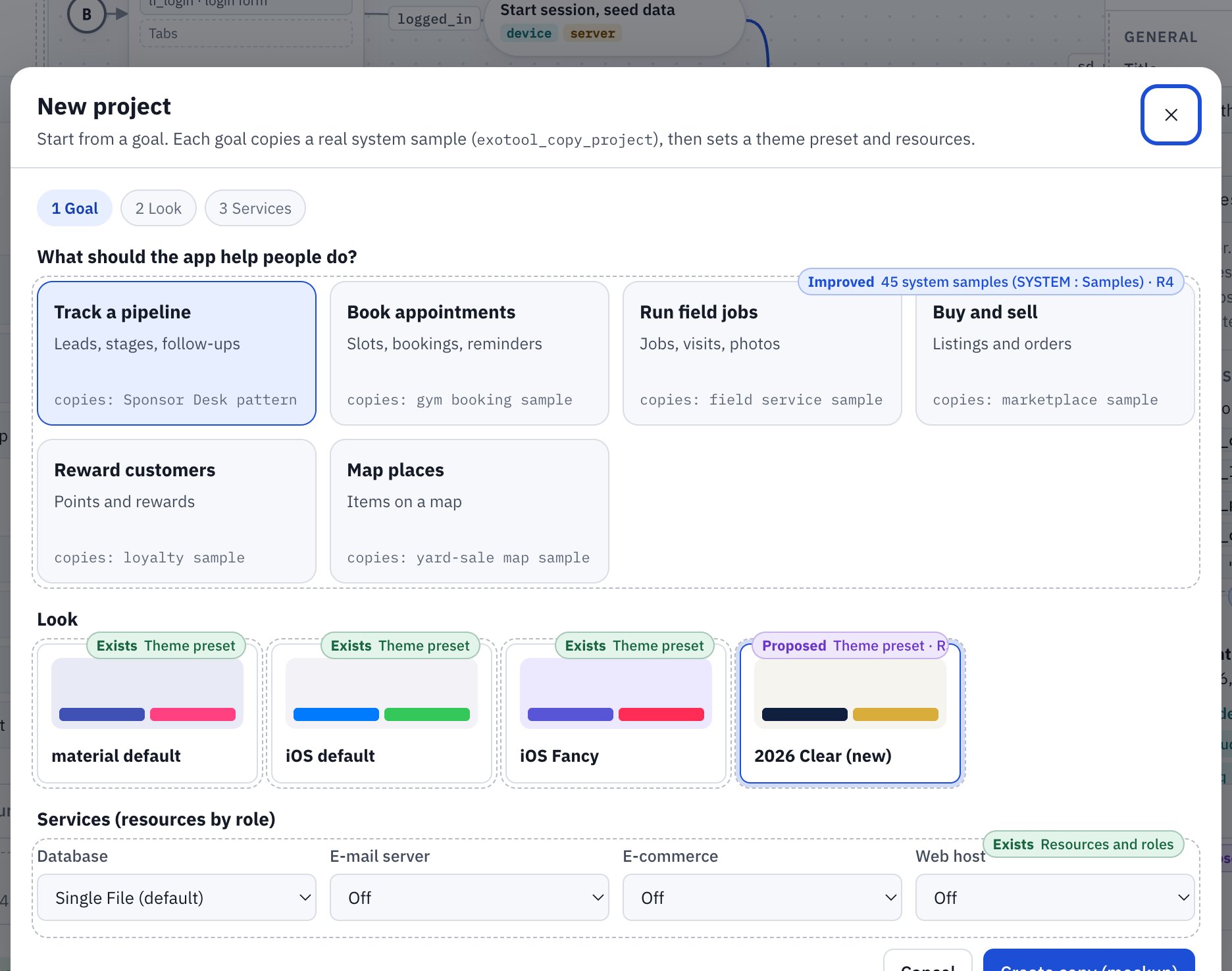
| R4 | Novices facing 45 unlabelled samples. | A “Start from a goal” picker: about 8 curated starters (booking, CRM pipeline, field service, directory, expense split, store, loyalty, internal tool) with screenshots and plain names. Hide test fixtures. Fix showcase samples that open on “Hello World!”. Each starter launches its Helper tour. | Samples, copy project, Helper tutorials engine | Curation, screenshots, a picker page, 2–3 more tours | Shorter time to a first useful app | Refinement | S–M | High |
| R5 | Experts and agencies making many or AI-made edits; novices unsure what a save did. | A “Change review” strip after each save: the elements added, changed or removed (highlighted on the canvas through the Helper bridge), compile status, who made the change (you, Claude, a teammate), and Undo. Keep 20 backups and let a backup be named. | Save and patch summaries, backups and undo, revision checks, Helper highlight and go-to, “Claude:” notices | Summary to canvas-highlight mapping; a longer backup history | Trust in AI and bulk edits; faster recovery; fewer support tickets | Refinement | M | High |
| R6 | Novices fighting layout rules and known defects. | Turn the best-practice list into editor behavior: auto-route connectors and auto-place new activities to the right; block or auto-wrap a link dropped on a page; fix form-field icons and Buttons Row, or hide them until fixed; flag an unconnected symlink live. | Auto Reposition, structural checks already run on save, Helper rules | Editor interaction work | Fewer silent failures; less to memorise | Refinement | M | Medium-high (canvas not viewed) |
| R7 | Agencies and owners worried about risk. | A data-exposure report per compile: which variables reach the device, which flows run on the server, which API endpoints exist, where raw JS or PHP blocks bypass analysis, and which activities lack a session or role check. | Compile facts, the API node list, the Helper rules engine | Report page and a few new rules | A concrete answer to “is this app safe?”; a strong sales asset | Refinement | M | Medium-high |
| R8 | Agencies and clients whose staff work in AI assistants. | Endpoint nodes published as MCP tools and OpenAPI, with app tokens scoped to named endpoints and bound to a user, rate limits and an audit log. | API node, generated call examples, MCP Tokens page, sessions | Token scopes, a tool descriptor generator, audit storage | Each app becomes usable from assistants without new code | Extension (new auth surface) | M–L | Medium |
| R9 | Novices who forget a permission check; owners needing assurance. | Declared access rules on cloud objects (for example “owner may edit”, “role ‘manager’ may read all”), enforced by the compiler on server paths and shown in the R7 report. | Cloud object types, sessions and user types, server placement | Rule syntax, compiler enforcement, a migration default (no rule = current behavior) | Secure by default instead of secure if remembered | Extension | L | Medium |
| R10 | Builders stuck on a compile error or a design question. | Enable Helper Ask, grounded in the diagram, errors and docs. It answers with element links and an optional patch that goes through R5. | Helper Ask box, rules, MCP patch path | Model integration, grounding, cost controls | Help at the moment of need | Refinement plus a recurring cost | M | Medium (current status unknown) |
| R11 | Agencies needing exit options and audits. | Project export: the diagram JSON, assets and the compiled bundle as a download, plus import. | The JSON diagram, the compile output, copy project | Packaging, import validation, licence terms | Reduces lock-in fear in sales | Refinement (commercial decision) | S–M | Medium |
| R12 | Users of real-time features. | Move broadcasts to POST, require a channel key or session server-side, and consider Server-Sent Events for delivery. | Signal and listen elements | Transport change behind the same elements | Safer, faster live updates with no diagram changes | Refinement | S–M | Medium (server not seen) |
| R13 | Owners wanting AI inside their apps. | The server-only ask_model built-in with typed output and spending caps (Agents role 2). | Location model, resources, PHP runtime | Built-in, resource type, metering | AI features without exposing keys | Extension | M | Medium |
3b. Steps that widen the moat and make Exotool much more useful
A moat is an advantage that grows with use and that a competitor cannot copy quickly. Section 3's table fixes what users expect. This section is about what could make Exotool hard to replace. One distinction matters:
- Not a moat (but required): a modern theme, install and offline support, version history, export and a security scanner. Competitors already document these (section 2c). They stop Exotool from losing deals, but they will not win deals on their own.
- A possible moat: anything that depends on the compiler understanding the whole app: every screen, every flow, and where each piece of logic and data runs. AI code generators produce ordinary source code; to match this they would need dependable whole-program analysis of code they did not design for it. That is possible, but slow and approximate. This is my inference, not a proven barrier.
The steps build on each other. Each one makes the next more valuable.
| Step | What to build | Why it is massively useful to users | What it builds on | Why it is hard to copy, and what could erode it | Copy resistance (inference) |
|---|---|---|---|---|---|
| 1 Make the compiler's knowledge visible | The change review strip (R5) and the data-exposure report (R7): for every save, show what changed, what runs where, and what data reaches the phone. | A builder can answer “what did the AI just do?” and “is client data exposed?” in seconds, without reading code. | Compile facts, save summaries, backups and undo | Rivals review code diffs (Lovable history, Replit checkpoints). Exotool can explain behavior and data placement. Erosion: rivals adding strong static analysis to generated code. | Medium-high |
| 2 Make safety part of the app model | Declared access rules (R9) checked at compile time. A save, by a person or an AI, that breaks a rule fails like a syntax error and is never published. | Apps are secure by default instead of secure if remembered. Owners can promise clients that an assistant cannot ship an app that breaks its own rules. | Step 1, the compiler, cloud object types, sessions | Bubble, Lovable and Retool have declared rules too. What is uncommon is the compiler blocking a change that breaks them. Erosion: rivals adding pre-deploy policy checks. | Medium |
| 3 Generate behavior checks from the flows | Because each flow is an explicit graph, Exotool can create test scenarios on its own (for example “a non-owner tries to edit, and is refused” or “a save with an empty amount is rejected”) and run them on each compile. | It closes the gap between “it compiles” and “it works”. Users find broken business logic before their clients do. | Flows and conditions in the diagram, Step 2's rules, the debugger runtime | Code tools can write tests, but must first work out the flows from the code; Exotool already has them as data. Erosion: AI test writers improving quickly. | Medium |
| 4 A library of verified parts, with an agency marketplace | Parts (login, booking, payments, sponsor pipeline, maps) that carry their own facts: what data they touch, where they run, which rules they need. The exposure is shown before a part is inserted. Agencies can publish and sell parts. | Novices build real apps from tested blocks. Agencies earn from their best work and build faster. | Extract and insert part, the cluster check, presets, Steps 1–3 | This is a network effect: each new part makes the platform more useful, which brings more builders, who add more parts. Erosion: low early on. It needs a critical mass of parts and a good quality bar. | High once it has scale |
| 5 “Assistant-ready” apps by default | Every API endpoint node becomes a typed MCP tool (R8) that runs as a user, obeys Step 2's rules and is listed in Step 1's report. The report tells an owner exactly what an assistant can and cannot do. | Staff can run real business steps from Claude or ChatGPT safely, with no extra code and no extra integration project. | API endpoint nodes, the MCP Tokens page, Steps 1–2 | Others expose apps through APIs and webhooks (Bubble, Retool). The edge is the combination: generated tools plus enforced rules plus an exposure report. Erosion: a common standard for agent permissions may arrive. | Medium |
| 6 Offline by design, not by effort | The compiler knows which writes are safe to queue on the device. It could generate offline queues and sync for those writes automatically (R2 phase 2). | Field teams, events and venues with weak signal get apps that keep working, with no special build work. | Device and server placement, the R2 service worker | FlutterFlow documents an offline PWA option, but automatic queueing chosen by the compiler's placement is uncommon in the docs checked. Erosion: offline-first database products. | Medium-high |
| 7 A learning loop from real use | With owners' consent, use anonymous, combined counts of compile errors and Helper card outcomes to improve rules, tours and AI prompts every month. | Help gets better the more people build; fewer users get stuck in the same place. | The Helper rule table (data, versioned), compile reports | A data advantage that grows with usage. Erosion: weak unless usage grows, and it must respect privacy terms. | Grows with scale |
| 8 Make leaving easy, so joining is easy | Full export (R11) and a published app-model format. | It removes the biggest fear of no-code buyers. | The JSON diagram, compile output | This is not a moat by itself. It lowers the price of trying Exotool, so Steps 1–7 reach more users. The compiler, parts and rules stay the reasons to stay. | n/a (adoption lever) |
3c. A working direction: the clickable mockup
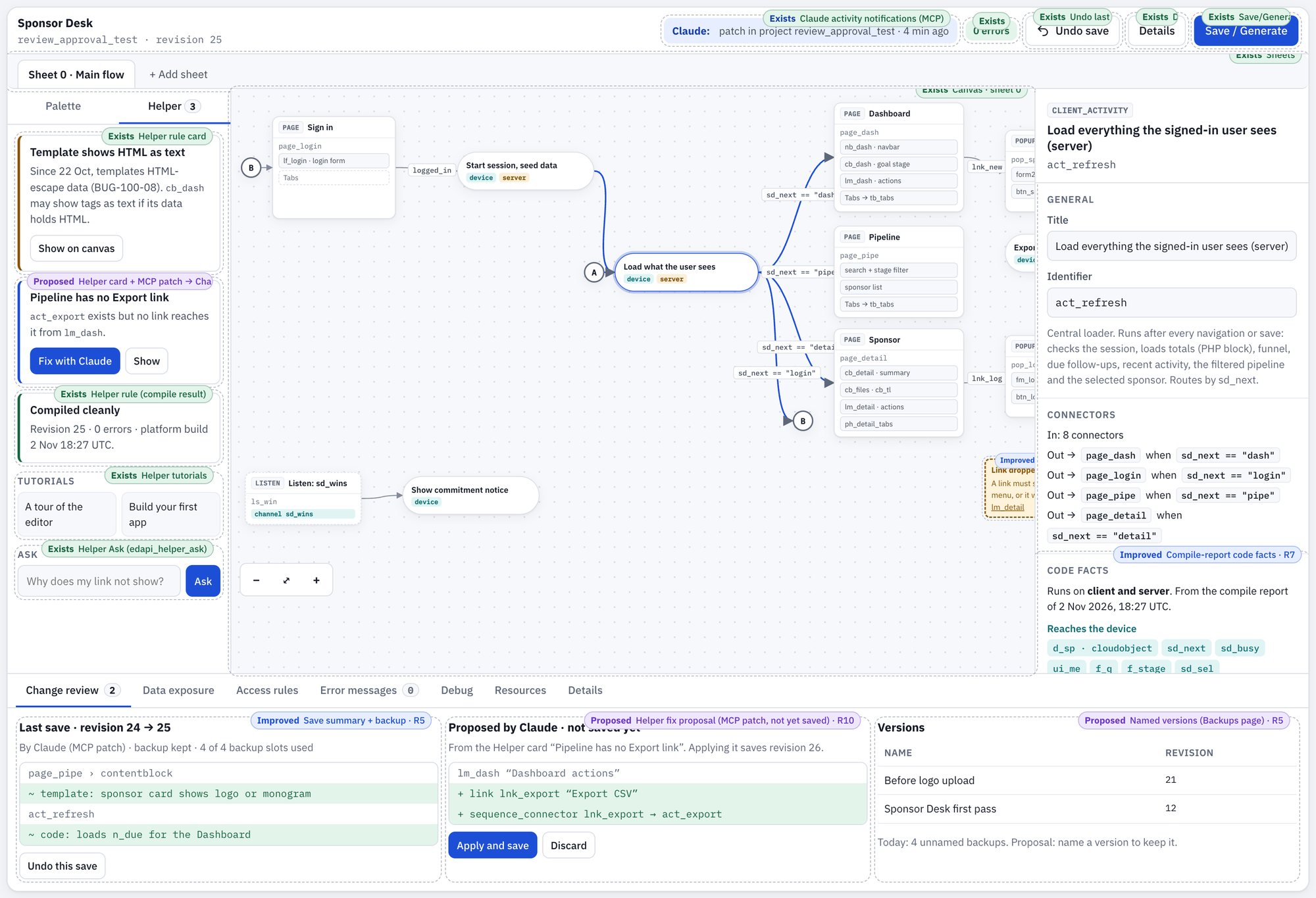
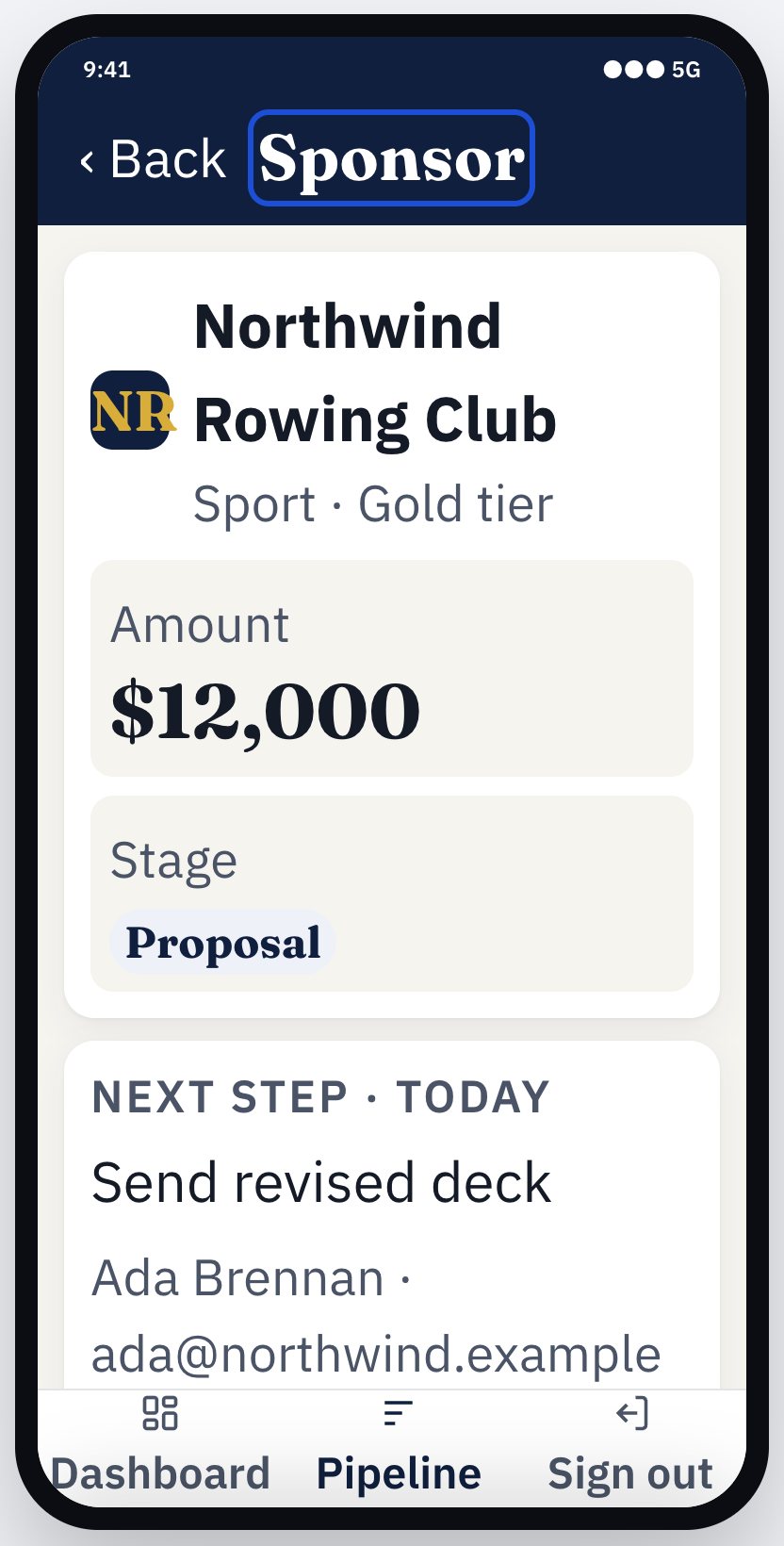
To show what these recommendations look like on screen, I built a clickable mockup of the editor and of the Sponsor Desk app it generates: https://exotool-ui-mockup-preview.cyrusprescod.workers.dev/. Each figure below links to the exact screen, so you can try it.
Proposal What it is and is not. It is a design mockup. It is not built on Exotool's code and has not been tested with users. It does use real material from the Sponsor Desk project (revision 25): the element keys, connector conditions, and the code facts from your compile report of 2 November. All sponsor data is fictional.
Every part maps to Exotool. The mockup has 49 labelled parts. 27 use Exotool exactly as it is today, 9 show an existing feature better, and 13 are proposals. Each proposal names the existing feature it builds on. The mockup's Feature map view lists all 49.
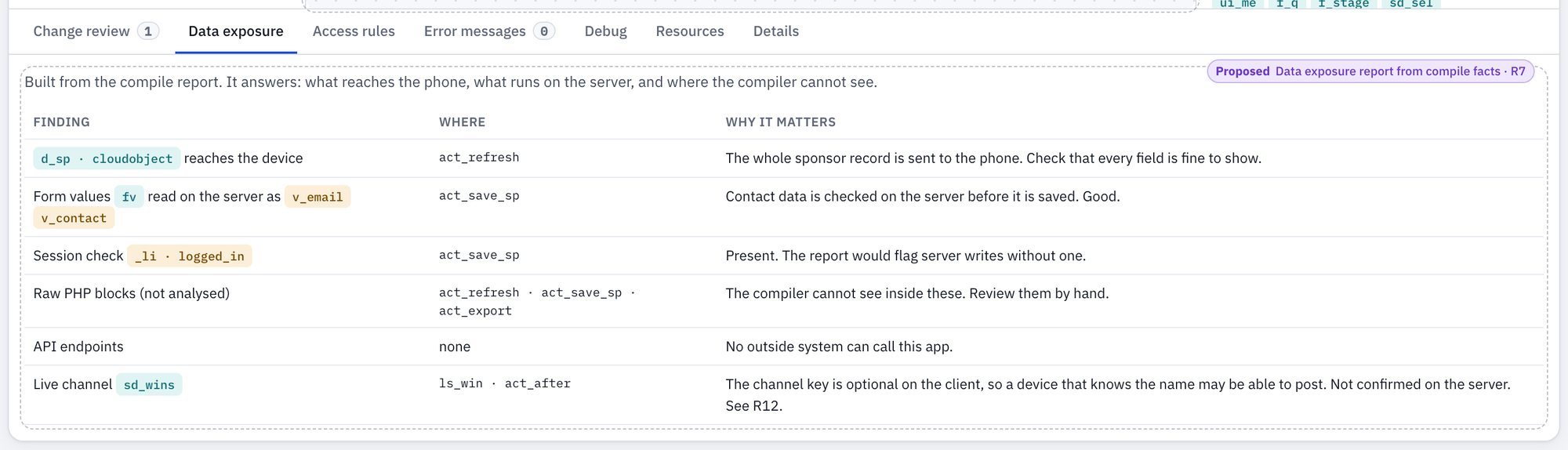
act_refresh sends the whole sponsor record (d_sp) to the phone. Access rules (R9) sit in the next tab. Open it · Access rules.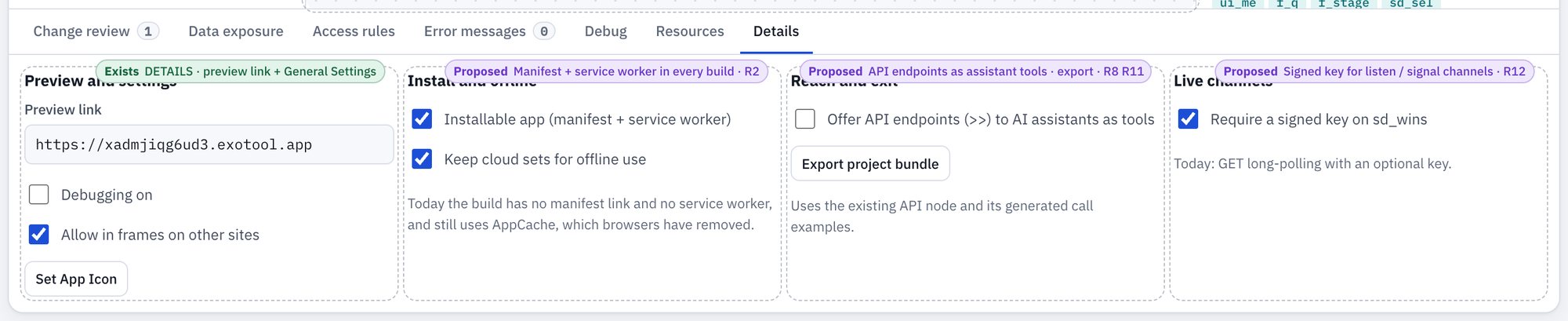
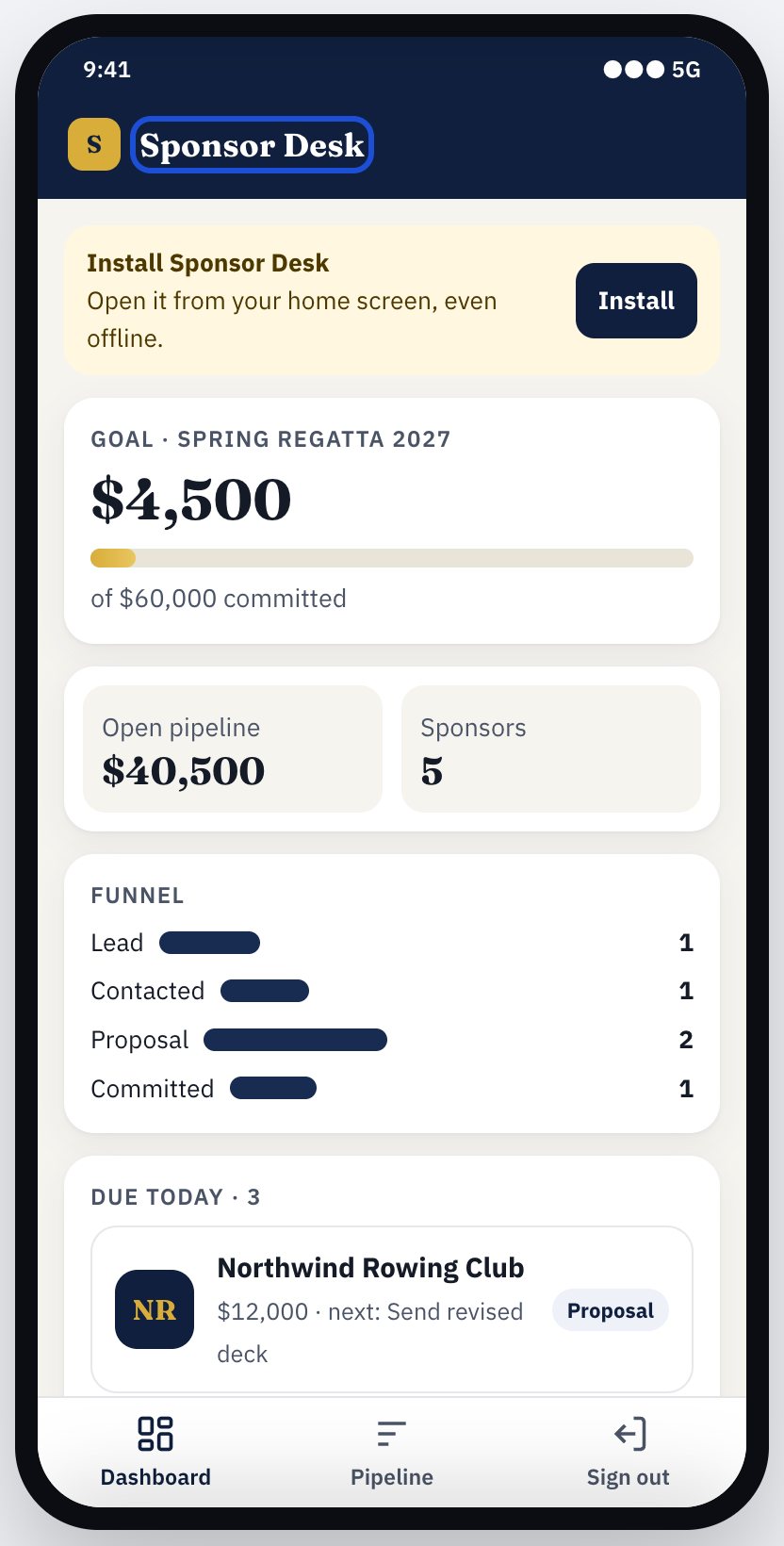
How each recommendation shows up in the mockup
| Rec. | What you see | Builds on (exists today) | Try it |
|---|---|---|---|
| R1 | Text at 200% that reflows; labelled fields; buttons instead of links | Generated viewport, form inputs and buttons | 200% text |
| R2 | Install banner, offline banner, “Installable app” setting | App icon, preview build | Open it |
| R3 | Light and dark 2026 theme; a fourth preset in New project | 3 theme presets | Open it |
| R4 | Goals that copy a sample | 45 system samples, copy project | Open it |
| R5 | Change review with diff, undo and named versions | Save summary, 4 backups, undo | Open it |
| R6 | Palette by intent and search; guided link drop | Element palette; nesting check in save and patch | Editor |
| R7 | Device and server badges; code facts; Data exposure report | Compile-report code facts (since 23 Oct) | Open it |
| R8 | “Offer API endpoints to assistants as tools” | API endpoint node and its call examples | Open it |
| R9 | Read, change and delete rules per cloud object type | Cloud object types, sessions, roles table | Access rules |
| R10 | “Fix with Claude” on a Helper card, landing in Change review | Helper rules, MCP patch | Open it |
| R11 | An “Export project bundle” button only | Diagram JSON, extract part | Open it |
| R12 | Signed-key setting; the live notice | Signal and listen | Live notice |
| R13 | Not shown. AI inside finished apps needs its own design. | – | – |
4. Before and after
Example A: one editor change helps a novice and an expert Hypothetical
The change is R5 (Change review) with R6 (auto-placement).
Before
Novice, Maya: She asks the assistant to “add a way to log a call.” It saves. A popup appears somewhere on sheet 0, partly behind another screen. She can't tell what changed, opens the preview, taps around, and isn't sure the call was saved.Agency lead, Dev: He applies the same edit to 6 client copies of a CRM. He relies on memory and the 4 most recent backups, and finds a broken connector two days later.
After
Maya: After the save, a strip reads “Added: Log activity popup, Save activity flow. Changed: Sponsor page menu. Compiles ✓ · by Claude · Undo”. Each item is a link that highlights the element, placed to the right of its trigger with straight arrows. She clicks “Save activity flow” and sees what it does.Dev: Each copy shows the same strip. One reports “1 warning: connector without condition”. He names the backup “before call-log rollout” and fixes the warning in place.
See it in the mockup: Change review with a pending fix (Figure 1).
Example B: a finished app for its end user Hypothetical, using Sponsor Desk
Before (today's markup)
Priya opens Sponsor Desk on her phone at an event. The text on the pipeline cards is small, and pinch-zoom does nothing. There is no “Install app” prompt, so she keeps a browser tab. In a basement hall with weak signal the page fails to reload, and her notes from a sponsor chat sit unsaved.After (R1 + R2 + R3)
Chrome offers “Install Sponsor Desk”, and it opens from her home screen in under a second from cache. The text is 16 px and zooms when pinched. Buttons are 44 px tall with clear pressed and disabled states. Offline, the app opens and shows “You're offline. Changes will send when you reconnect” (phase 2 of R2). The commitment banner from a teammate still arrives through signal and listen when she is back online.See it in the mockup: install banner, 200% text, offline (Figure 4).
5. Owner-side scope and cost
Relative estimates only. I don't know your team size, rates or hosting contracts, so no calendar or dollar figures are given. S, M and L compare items with each other.
| Group | Items | Design labor | Engineering labor | Migration and compatibility | Recurring infrastructure or model charges | Support |
|---|---|---|---|---|---|---|
| Near-term refinements | R1 accessible shell · R2 phase 1 manifest + service worker · R4 goal-based starters · R12 messaging transport · R11 export | S (R4 curation and screenshots) | S–M in total | Low. Apps pick up changes on recompile. Check that custom CSS in agency apps survives R1 markup changes. A stale AppCache needs a one-time clean-up. | Near zero. Static files and a little more caching. | Low; a short “what changed” note |
| Next investments | R3 2026 theme · R5 change review · R6 editor guardrails · R7 exposure report · R10 Helper Ask | M (R3 tokens and states; R5 strip; R6 interactions) | M each for R5, R6 and R7; M for R3 restyling | R3 is opt-in per project, so no forced migration. R5 raises backup storage (for example from 4 to 20 per project). | R3, R5, R6 and R7: little vendor spend beyond storage. R10: per-question model charges unless you use bring-your-own key. | Medium for R10 (wrong answers); low otherwise |
| Longer-term bets | R8 agent-callable endpoints · R9 declared access rules · R13 in-app ask_model · R2 phase 2 offline writes | S–M | L for R9 and R2 phase 2; M–L for R8 and R13 | R9 needs a default of “no rule = today's behavior” so existing apps keep working. R2 phase 2 needs conflict rules for shared data. | R8: token and audit storage, rate limiting. R13: model charges per call (pass-through or metered). | Medium–high: customers' assistant setups, token resets, AI output questions |
Assumptions that change cost the most.
- Whether existing apps are recompiled automatically after a platform update, or only when their owners save. Automatic recompiles spread R1 and R2 instantly, but raise regression risk.
- How far Framework7 1.4 can be restyled. If the token layer fights it, R3 grows toward a UI-kit migration (L).
- Who pays model charges: the owner, or customers with their own key.
- How much server-side session and role data is already available to the compiler. This sets the cost of R9.
- How many existing apps use custom CSS or raw JS that depends on today's markup.
Little extra vendor spend, but still development time: R1, R2 phase 1, R3, R4, R5, R6, R7, R11 and R12. All of these are template, editor or report work on infrastructure you already run.
6. The recommendation to lead with in sales
The pitch: “With Exotool, you or your AI assistant describe a change, and the platform checks it before it goes live. It compiles, it's backed up, and it can be undone in one step. You never hand-write the plumbing between phone and server, because the compiler places every piece of logic itself.”
What supports it today. Revision checks refuse stale edits. A backup is made before every save, patch and undo, and one-step undo exists. Compile and structural errors come back with exact paths, and the docs say they are checked before anything is called done. Per-element compile facts show where each piece of logic and data runs. Sponsor Desk, an 18-activity, 6-screen app whose diagram metadata shows it was edited through MCP, compiles with 0 errors on revision 25. All of this is Observed in the MCP tools, the docs and the rundown.
What must exist before you claim the stronger version (“an AI can't ship an unsafe or broken app on Exotool”):
- Declared access rules enforced by the compiler (R9) and the data-exposure report (R7). A clean compile today proves structure, not correct permissions or business behavior.
- Change review in the editor (R5), so the human check is visible rather than implied.
- A modern, accessible, installable shell (R1–R3), so the “safe” app is also one people want to use.
- A published security note on live messaging and file uploads, after you have reviewed the server side (R12).
Thank you for building something with a genuinely different core. I hope this helps you choose what to do next.
Cyrus Prescod